Save your favorite passages from every book.
Save quotes from paper books without retyping them. Snap the page, select the lines and build your searchable library.
 Free for your first 20 snippets
Save quotes from paper books without retyping them. Snap the page, select the lines and build your searchable library.
Free for your first 20 snippets
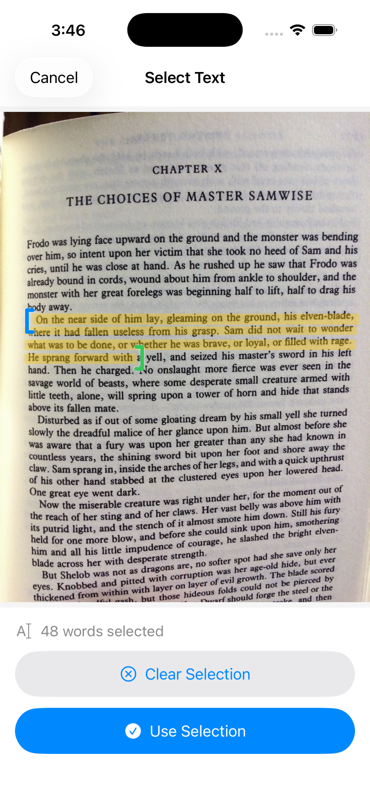
Open BookSnippet, point your camera at the spread, and shoot. Skewed angle, curled spine, dim lamp — the page gets straightened and cleaned up automatically.
On-device text recognition finds every word on the page. Tap the passage you want, exactly like marking a line in the margin.
Scan the barcode once and the title, author, and cover fill themselves in. Every snippet lands in the right book, in your library, forever.
The passages you meant to keep should not disappear into your camera roll.
Text recognition happens on your iPhone, so printed passages become selectable text in seconds.
Perspective correction and de-skewing straighten the page before recognition, even when the photo is taken at an angle.
Scan the barcode once and BookSnippet fills in the title, author, and cover so every snippet lands in the right place.
Turn any saved snippet into a clean quote card with the passage, book, and author ready to post or send.
“I remember it as if it were yesterday.”
Your saved passages can become quote cards in seconds, with the book and author included.
Post them to your feed or send them to a friend.
BookSnippet Pro
$4.99
One-time purchase.
Take a photo of the page with BookSnippet, then tap to highlight the lines you want. On-device text recognition turns the printed passage into searchable text and files it under the right book — no typing required.
Yes. Text recognition runs entirely on your iPhone, so you can capture and search snippets without an internet connection. Only the optional ISBN book lookup needs to be online.
Your first 20 snippets are free, with full OCR, ISBN book lookup, and quote card sharing included. BookSnippet Pro unlocks unlimited snippets for a one-time purchase of $4.99 — no subscription.
Everything stays on your iPhone. Your snippets, photos, and library are stored on-device, nothing is uploaded to a server, and no account is needed.
BookSnippet is an iOS app for iPhone, available on the App Store.
Free on the App Store. Your first 20 snippets are on us.